


MSN Weather - Forecast & Maps
4.01.78K Reviews
App Specs
- Version
- 30.2.260625002
- Updated On
- License
- Free
- Downloads
- 1,000,000+
- Developer
- Microsoft Corporation
- Categories
- Weather
- Platform
- Android, iOS
Screenshots
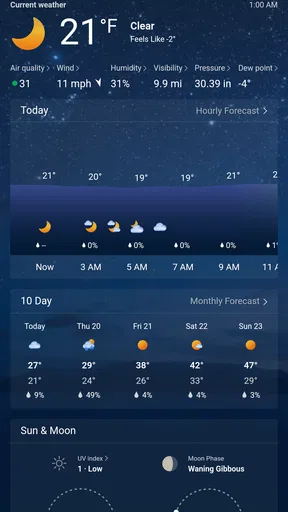

 Analysis by AppCompare
When I decide whether a weather app is worth keeping, I start with a simple question: does it help me make a better decision before I leave home? MSN Weather - Forecast & Maps is Microsoft Corporation’s free weather app, and its appeal is the mix of everyday forecasts and visual tools rather than a complicated setup. I find it most useful as a quick planning aid: check what the day looks like, then look closer when the forecast might affect a trip or an outdoor plan.
What free access means here
The app is free to download, so there is no purchase decision to make before trying it. I see that as a practical advantage for a tool I may open briefly several times a day: I can check conditions without weighing a subscription against how often I use it. Free access does not, by itself, tell me anything about every possible in-app term, so I would not assume more than the confirmed fact that the app is free.
That low barrier is useful if you want to compare its forecasts with the weather app already on your phone. Use both for a few days in the places that matter to you, and judge them by the decisions you actually make: whether to walk, carry a coat, move an outdoor errand, or allow extra time for weather. I would not choose a forecast solely because one screen looks more polished; consistency for your location is more important.
Where the value comes from
The practical value is in bringing several kinds of weather information into one place. A quick glance can answer an immediate question, while the hourly view, longer forecast, and map give me ways to investigate instead of relying on a single current-condition label. That range suits people who want a straightforward check most of the time but occasionally need more context before committing to plans.
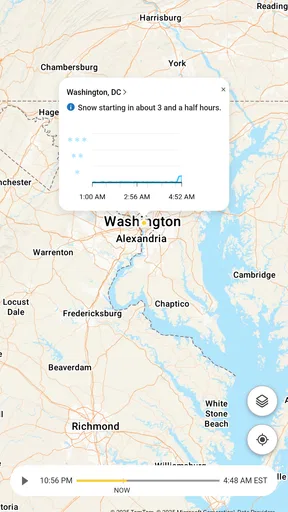
The map is particularly worthwhile when conditions vary across a route or a larger area. Rather than treating the forecast for one saved place as a complete picture, I can use the map to see how weather patterns appear around it. That is not a guarantee that the map predicts exactly what will happen at a particular street or minute, but it gives me a useful reason to pause before assuming the weather is identical across a whole region.
There is also value in keeping more than one location handy. I might compare home with a destination before setting out, or check on a city where family lives. That is a different habit from repeatedly searching for a place each time: saved locations make the comparison easier and help turn a forecast into a concrete plan.
Getting Started with MSN Weather
First things first, downloading this app is a breeze. Available on both Android and iOS, you’ll find it in your respective app store. Once installed, the setup is pretty straightforward. MSN Weather asks for your location to provide the most accurate forecasts, and don’t worry, you can add multiple locations, which is super handy if you’re a frequent traveler or want to keep tabs on the weather in a few different cities.
Worth Reading Before You Choose

EA SPORTS FC Mobile 26 Is a Bigger Football Game, but It Takes Time

Flipboard Shows What News Apps Must Do Beyond the Feed

Switching to Android Auto Means Rethinking Your Driving Routine

Google Calendar Makes a Crowded Week Easier to Manage

Ludo King Makes the Most of the Minutes Between Plans

Baby Panda World Brings Quick Play to Modern Phones, but Its Game Library Feels Busy
User Interface and Experience
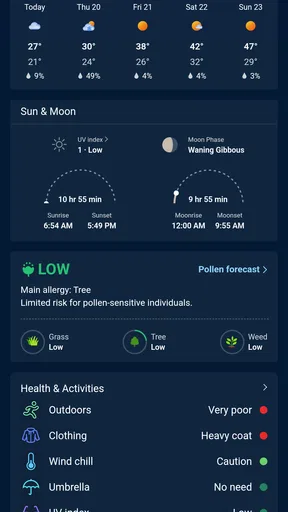
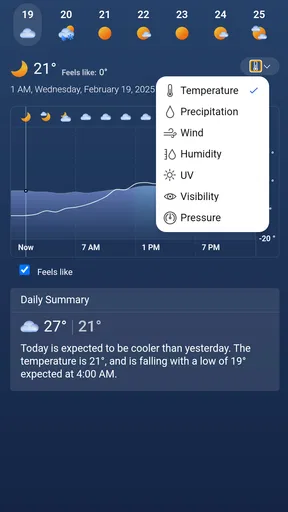
The interface is clean and user-friendly. You’re greeted with a simple home screen that displays the current temperature, weather conditions, and some other nifty details like wind speed and humidity. What I love the most is the ease of navigation. You can swipe to check hourly and weekly forecasts. The app also integrates beautifully with your device’s settings, offering widgets that keep you updated without even opening the app.
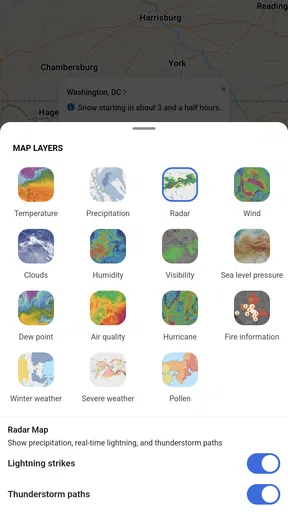
One of the coolest features is the interactive weather map. You can zoom in and out, and even see real-time weather patterns. It’s almost like having your personal meteorologist right in your pocket!
Features You’ll Love
Beyond the basic forecasts, MSN Weather is packed with features that make it stand out. Here’s a quick rundown:
- Severe Weather Alerts: Get notified instantly about any severe weather conditions in your area. It’s a lifesaver during those stormy seasons.
- Weather News: Stay updated with the latest weather news. It’s like having a mini weather channel right in the app.
- Historical Weather Data: Curious about what the weather was like last year? The app has you covered!
What’s really neat is how customizable everything is. You can set the units to your preference—Celsius or Fahrenheit, and choose between different themes for a personalized feel.
Performance and Reliability
In terms of performance, MSN Weather is pretty solid. It loads quickly and updates in real-time, so you’re never left hanging. I’ve found it to be incredibly accurate, which is critical when planning anything around the weather. The app doesn’t crash or lag, making it a reliable tool to keep in your digital arsenal.
Integration with Other Microsoft Services
If you’re already using other Microsoft services, you’ll appreciate how well this app integrates with them. It syncs seamlessly with your Microsoft account, allowing for a more cohesive experience across your devices. This is particularly useful if you’re someone who likes to have everything interconnected.
Plus, the app's collaboration with Bing Maps provides a visually appealing weather map experience that’s both informative and easy to use.
Limits worth keeping in mind
Weather forecasts are guidance, not promises, and I would treat a broad outlook differently from a decision that depends on precise timing. If a storm could affect a long drive, an outdoor event, or a safety-sensitive activity, I would check the map and alerts close to departure and consult an appropriate local source as well. A forecast that looks reassuring earlier in the day can change, so no single app should replace common-sense caution.
The amount of detail can also be more than a casual user needs. If you only want a one-line answer and never look at maps, saved places, or forecast periods, a built-in phone weather app may be quicker and feel less busy. On the other hand, people who enjoy examining changing conditions may find a map and multiple forecast views more helpful than a minimal widget. The better choice depends on whether you want context or just a glance.
Location access is another practical choice. Allowing it can make local checks easier, while adding locations manually may suit someone who prefers not to rely on automatic location detection. I would choose the option that fits how I use my phone, then verify that the displayed place is the one I mean—especially when planning for a destination rather than where I am now.
A useful routine for everyday planning
Imagine I have an outdoor appointment after work and a short trip across town beforehand. In the morning, I would check the hourly forecast rather than relying only on the current conditions, then look at the map if rain or changing weather seems likely. I would save the destination so I can compare it with home, and use a widget for a quick later check. If the app shows a severe-weather alert, I would treat that as a reason to reconsider the plan, not as a substitute for checking the situation again before leaving.
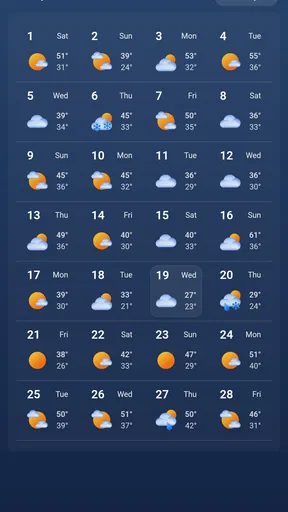
That routine also helps avoid a common mistake: reading the weekly forecast as if it were equally dependable for every day. I use the longer view to spot a potentially inconvenient day and keep plans flexible; as the day approaches, I check the hourly view for decisions about timing. The distinction is small but useful. A broad forecast can guide planning, while a nearer-term check is better suited to deciding whether to take the bike or move an errand.
Historical weather information has a different role. I would use it to satisfy curiosity or get a sense of what a season has been like, not to treat last year’s conditions as a prediction for this year. That makes it an interesting extra for people who like context, but not the feature I would rely on to decide what to wear tomorrow.
How it compares with other weather apps
Compared with the simple weather screen that comes with a phone, this app is more appealing when I want to move beyond the current temperature: multiple places, forecast views, maps, alerts, and weather news give me more to explore in one app. A built-in option may still win for speed if I rarely need anything beyond the conditions outside. I would not install a separate app just to duplicate a glance I already get comfortably.
Against specialist forecast apps, the choice is less about which one is universally best and more about what kind of information I want to use. Someone who needs a particular local data source, detailed specialist measurements, or a workflow tailored to a professional activity should compare those tools directly and verify that they serve the relevant area. MSN Weather is easier to recommend as a general-purpose companion than as a specialist instrument. Its combination of accessible forecasts and maps is the draw; users with demanding, highly specific needs may prefer an app built around those needs.
Microsoft’s name may be reassuring if you already use its services, but I would not make that the main reason to choose it. The more useful test is whether its forecast presentation, saved locations, and map fit your routine. The app has a 4.1 average from around 43,000 ratings, and more than a million installs, which suggests many people have tried it; neither figure can tell me whether it will be the best match for my particular location or habits.
Who is likely to get the most from it
I would recommend it to someone who wants a free, general weather app with more depth than a single current-conditions card, especially if they compare home with another city or like checking a map before travelling. It is also a sensible option for a household that wants a shared habit of checking forecasts before outdoor plans, though each person should still make their own decision when conditions matter.
It may be a poor fit if you want a highly specialized forecasting tool, dislike exploring several views, or need a forecast tailored to a specific professional task. In those cases, I would test a specialist alternative rather than expect a general app to cover every requirement. The app is rated for Everyone, and its current version is 30.2.241212005; it first appeared on December 11, 2014. Those details help identify the product, but the day-to-day fit still comes down to how clearly it serves your plans.
Final Thoughts
All in all, MSN Weather - Forecast & Maps is a fantastic app for anyone who wants a comprehensive and reliable weather forecasting tool. Whether you’re someone like me who just likes to know if you need an umbrella, or you’re a weather enthusiast who loves diving deep into meteorological data, this app has something for everyone.
So, if you’re tired of getting caught in the rain or just want to stay informed about the weather, give MSN Weather a try. It’s free, easy to use, and packed with features that will make weather-checking a breeze.
My buy-or-skip verdict
My recommendation is to try it if you want a no-cost way to combine basic checks with maps and a few different locations. The key benefit is not that it removes uncertainty; it gives me more ways to notice it and adjust a plan. If all you need is a temperature on your home screen, your existing weather option may already do the job. If you need specialist detail or rely on precise local conditions for safety-critical decisions, compare dedicated sources instead.
For an everyday user, the sensible test is simple: save the places you actually visit, check the hourly view when timing matters, and see whether the map adds useful context rather than distraction. If those steps make planning feel easier, the free app earns its place on your phone. If you keep opening it only to see the same single number, there is little reason to switch from a simpler alternative.
Pros
- Intuitive and user-friendly interface.
- Detailed weather maps and radar.
- Customizable weather alerts.
- Accurate forecasts for multiple locations.
- Minimal data usage for updates.
Cons
- Ads can be intrusive at times.
- Limited offline functionality.
- Occasional slow loading of maps.
- No widget customization options.
- Requires account for some features.
FAQs for MSN Weather - Forecast & Maps
What features does MSN Weather offer?
MSN Weather provides a comprehensive suite of features, including detailed forecasts, interactive radar maps, and severe weather alerts. Users can access hourly, daily, and 10-day forecasts, as well as weather updates for multiple locations. The app also offers personalized weather news and ski reports, making it a versatile tool for planning your day.
Is MSN Weather available for both Android and iOS?
Yes, MSN Weather is available for both Android and iOS devices. Users can download the app from the Google Play Store for Android devices and the Apple App Store for iOS devices. The app is optimized for both platforms, ensuring a seamless experience across different devices.
Does MSN Weather require an internet connection to function?
While the app needs an internet connection to provide the latest weather updates and download map data, users can access previously downloaded data offline. However, to ensure the most accurate and up-to-date information, it's recommended to connect to the internet periodically.
Are there any costs associated with using MSN Weather?
MSN Weather is a free application with no hidden costs, offering a wide range of features at no charge. There are no in-app purchases required to unlock additional content, making it accessible for all users seeking reliable weather forecasts without financial commitment.
How accurate are the weather forecasts provided by MSN Weather?
MSN Weather delivers forecasts using data from multiple reliable sources, including the National Weather Service and other meteorological institutions. While no weather app can guarantee 100% accuracy, MSN Weather is known for its reliable updates and detailed information, helping users plan their activities with confidence.


